> ## Documentation Index
> Fetch the complete documentation index at: https://docs.nebuly.com/llms.txt
> Use this file to discover all available pages before exploring further.
# ROI
> Quantify the economic value of your AI agents: how much time they save your users and what that time is worth.
Organizations invest heavily in AI agents to improve productivity, reduce operational costs, and automate repetitive work. Yet one question is often difficult to answer:
> **What business value is our AI actually generating?**
Most organizations measure AI adoption using metrics such as active users, conversations, or requests processed. While these metrics show that employees are using AI, they don't demonstrate whether AI is creating measurable business impact.
Without a clear way to quantify value, it's difficult to:
* Justify AI investments and renewals.
* Prioritize AI initiatives.
* Compare performance across teams or projects.
* Measure whether AI adoption is actually improving productivity.
AI ROI closes this gap by estimating how much time AI saves employees and translating that time into economic value. Instead of measuring **how much AI is used**, it measures **how much value AI creates**.
With AI ROI, you can:
* Quantify time saved across your organization.
* Measure the financial impact of AI adoption.
* Identify the AI use cases generating the highest ROI.
* Compare ROI across projects, teams, or business units.
## How AI ROI works
Nebuly analyzes successful AI conversations and estimates how much work was completed by the AI instead of a human.
For every interaction and conversation, Nebuly calculates:
* **Success** — whether the conversation meets your configured success criteria and should be included in the ROI calculation.
* **Time saved** — the estimated time a person would have spent completing the same task manually.
* **Value saved** — the monetary value of that time based on your configured average hourly cost.
Read [here](/untitled-page) to learn more about ROI settings.
Nebuly combines these settings to estimate the overall business impact of your AI applications, reporting the **net monetary value (USD)** generated and the **total time saved** compared to completing the same work manually.
> **ROI = Time Saved \* Net Hourly Cost**
Enabling ROI is what triggers the AI analysis of conversations, and it is scoped to your project only. Leave it off for projects where economic value tracking is not relevant.
## The ROI report
Nebuly's **AI ROI** report provides a comprehensive view of the business value generated by your AI applications. The report updates automatically as new interactions are analyzed.
It includes the following visualizations:
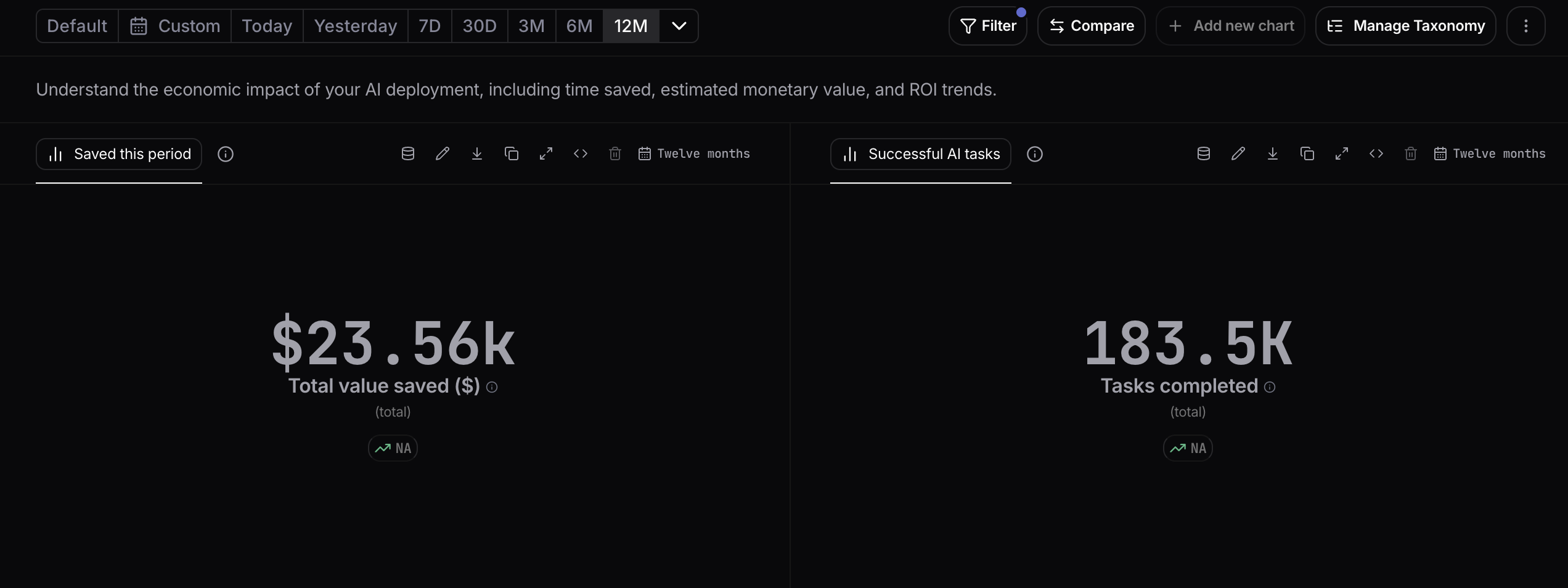
### Total value saved
Shows the estimated **net monetary value** generated by AI during the selected period. This metric combines the net estimated labor cost saved with the AI execution cost to quantify the overall financial impact of your AI deployment.
### Successful AI tasks
Displays the total number of AI-assisted tasks that successfully met your configured **Success Criteria**. Only these tasks contribute to the ROI calculations.
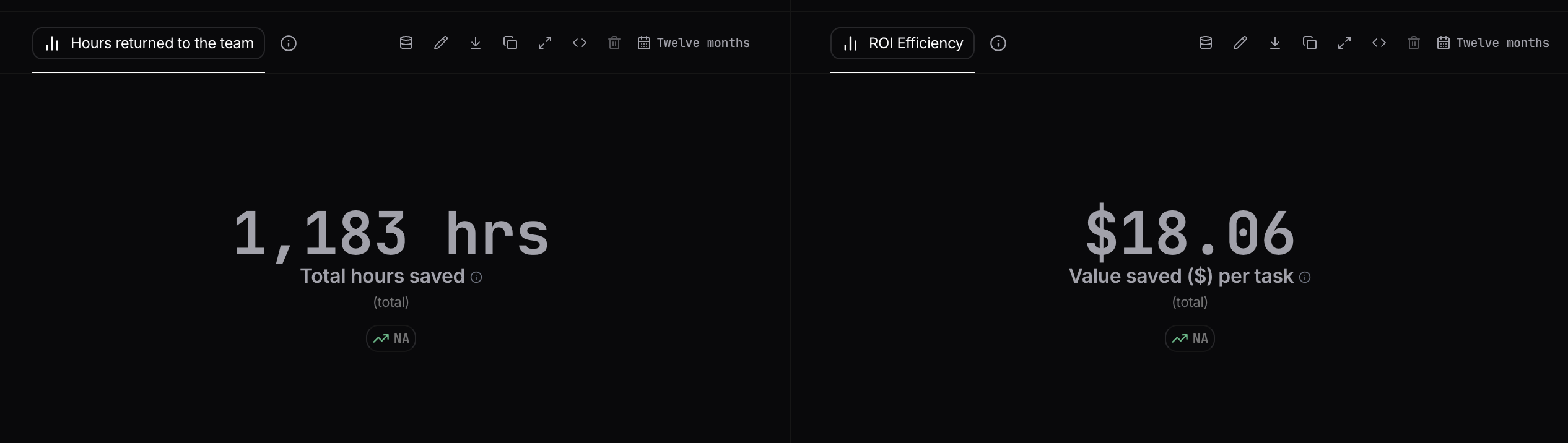
 ### Hours returned to the team
Shows the total number of working hours saved by employees thanks to AI. This represents the amount of time that has been freed up and can be reallocated to higher-value activities.
### ROI efficiency
Displays the average **net value generated per successful AI task**. This helps you understand which AI interactions create the greatest business value and track improvements over time.
### Hours returned to the team
Shows the total number of working hours saved by employees thanks to AI. This represents the amount of time that has been freed up and can be reallocated to higher-value activities.
### ROI efficiency
Displays the average **net value generated per successful AI task**. This helps you understand which AI interactions create the greatest business value and track improvements over time.
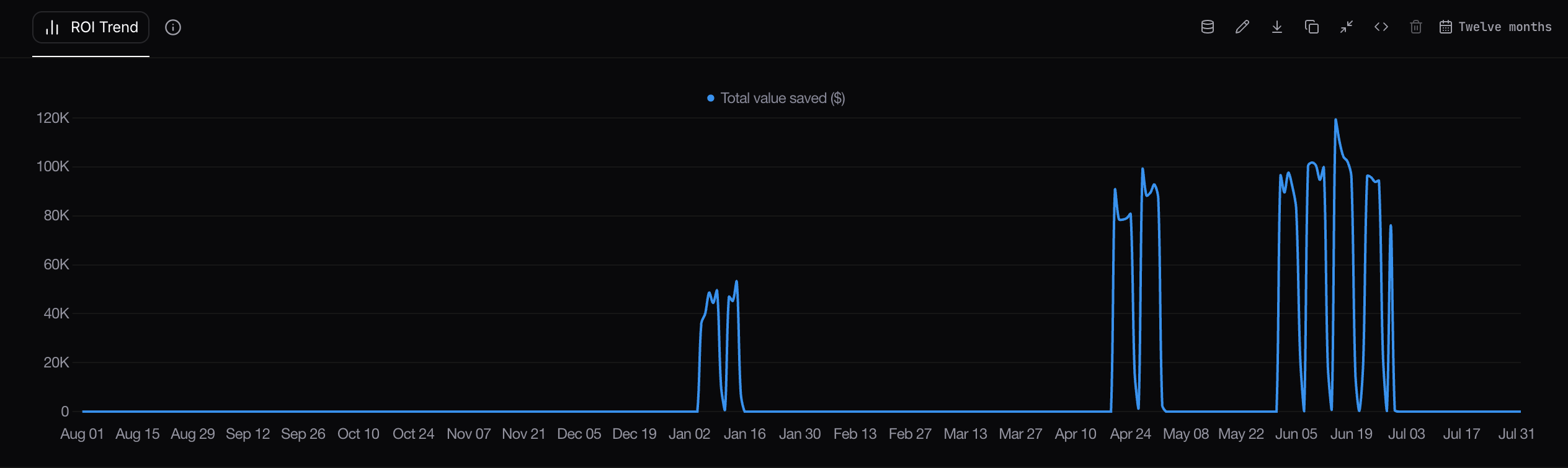
 ### ROI trend
Tracks the total value generated by AI over time. Use this chart to monitor how ROI evolves, identify adoption trends, and measure the impact of new AI initiatives or feature releases.
### ROI trend
Tracks the total value generated by AI over time. Use this chart to monitor how ROI evolves, identify adoption trends, and measure the impact of new AI initiatives or feature releases.
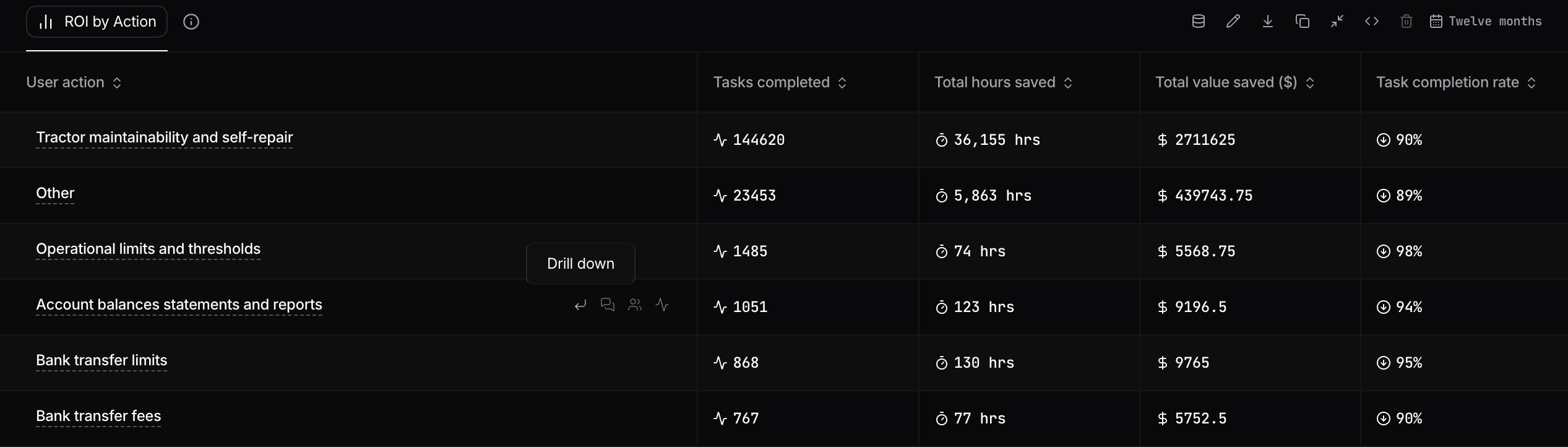
 ### ROI by action
Breaks down ROI by **User Action** in your taxonomy, allowing you to identify the AI use cases generating the greatest value.
For each action, Nebuly reports:
* **Tasks completed** – Number of successful AI-assisted tasks.
* **Total hours saved** – Total estimated manual time eliminated.
* **Total value saved** – Net monetary value generated.
* **Task completion rate** – Percentage of conversations that met your configured success criteria.
This view helps you identify which workflows deliver the highest ROI and where there are opportunities to improve AI performance or user adoption.
### ROI by action
Breaks down ROI by **User Action** in your taxonomy, allowing you to identify the AI use cases generating the greatest value.
For each action, Nebuly reports:
* **Tasks completed** – Number of successful AI-assisted tasks.
* **Total hours saved** – Total estimated manual time eliminated.
* **Total value saved** – Net monetary value generated.
* **Task completion rate** – Percentage of conversations that met your configured success criteria.
This view helps you identify which workflows deliver the highest ROI and where there are opportunities to improve AI performance or user adoption.
 ## Building your own ROI reports
All AI ROI metrics and dimensions are available throughout Nebuly's reporting engine, allowing you to build custom reports tailored to your business.
You can combine ROI metrics with existing metrics, filters, and groupings to answer questions such as:
* Which AI use cases generate the highest ROI?
* Which departments save the most time?
* How has ROI evolved over time?
* Which teams generate the greatest business value from AI?
* Which topics or user actions have the highest task completion rate?
* Which AI agents deliver the greatest economic impact?
By combining AI ROI with the rest of your workspace data, you can measure the business impact of AI, identify your highest-value use cases, and continuously optimize your AI investment.
## Building your own ROI reports
All AI ROI metrics and dimensions are available throughout Nebuly's reporting engine, allowing you to build custom reports tailored to your business.
You can combine ROI metrics with existing metrics, filters, and groupings to answer questions such as:
* Which AI use cases generate the highest ROI?
* Which departments save the most time?
* How has ROI evolved over time?
* Which teams generate the greatest business value from AI?
* Which topics or user actions have the highest task completion rate?
* Which AI agents deliver the greatest economic impact?
By combining AI ROI with the rest of your workspace data, you can measure the business impact of AI, identify your highest-value use cases, and continuously optimize your AI investment.