> ## Documentation Index
> Fetch the complete documentation index at: https://docs.nebuly.com/llms.txt
> Use this file to discover all available pages before exploring further.
# Share live data
You can generate a link to a single **conversation** or **interaction** to share with colleagues and external users, without giving them a seat in Nebuly. Open the page you want to share and use the **Share** button in the top right of the screen to create the link.
The link gives the recipient access to that page without requiring them to log in to Nebuly, the same anonymous-link mechanism used for reports, scoped to the single page you are viewing.
Share links are for **anonymous, external access**. If you want to send a logged-in Nebuly user directly to an interaction or conversation, use a `/go` deep link instead. See [Deep-link to an interaction or conversation](/guides/share-interaction-and-conversation-link).
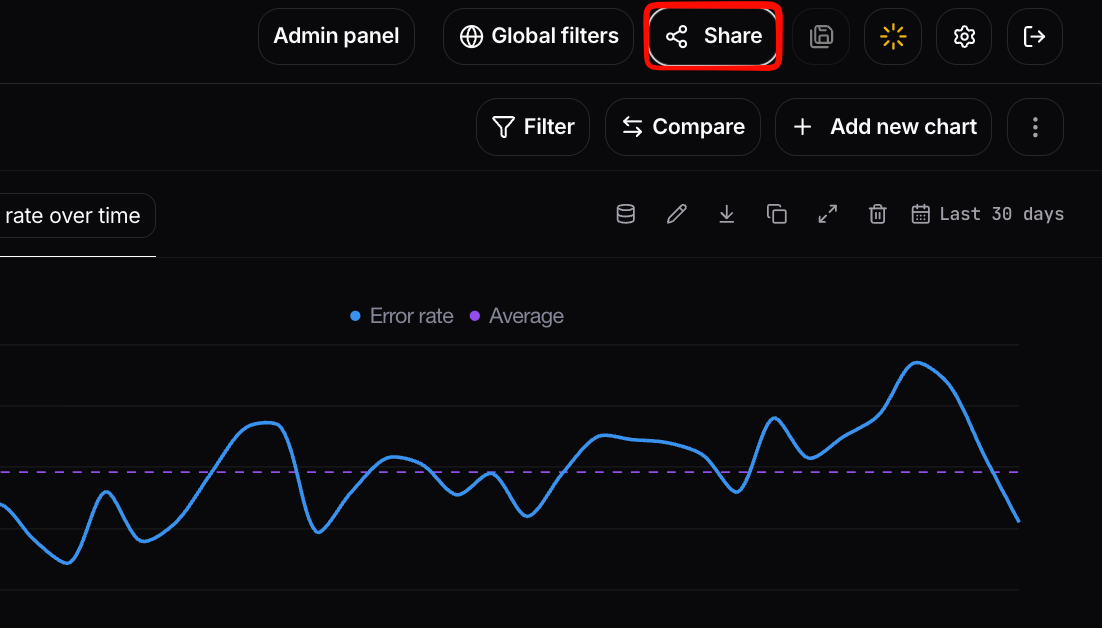 ## Configuring a share link
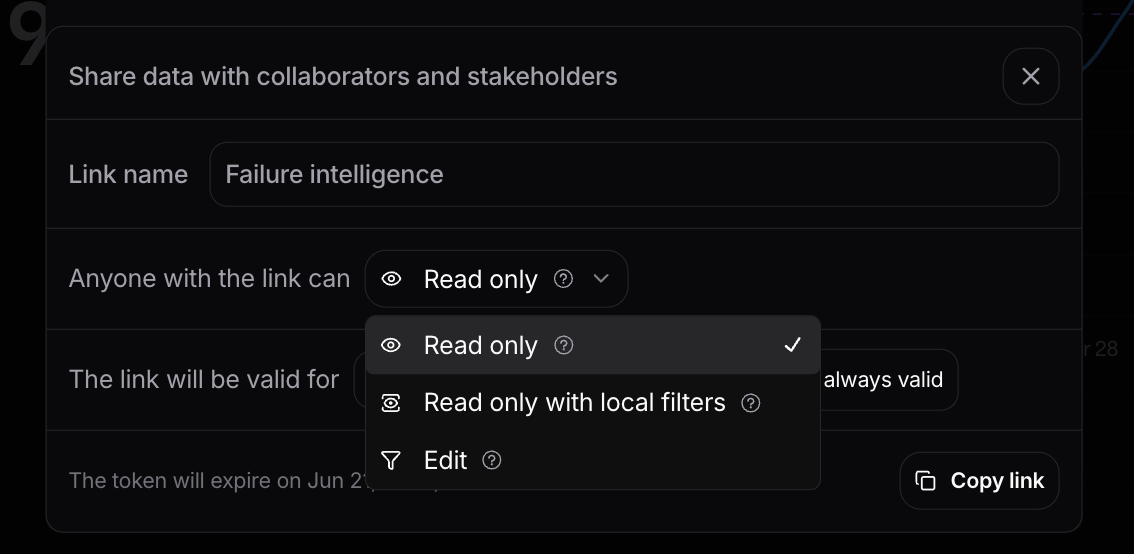
When you share a page externally you can configure the same controls available for reports:
* **Read-only access:** the recipient can view the page but cannot make any changes.
* **Time-limited access:** set an expiration on the link so it stops working after a chosen date.
* **Scope enforcement:** the link only ever exposes the page you shared. Project-level filters and permissions are enforced, so data outside that scope is never revealed to the recipient.
This is the recommended way to communicate a specific finding (a notable conversation, a failure example, a representative interaction) to a wider audience without granting them seats in Nebuly.
## Configuring a share link
When you share a page externally you can configure the same controls available for reports:
* **Read-only access:** the recipient can view the page but cannot make any changes.
* **Time-limited access:** set an expiration on the link so it stops working after a chosen date.
* **Scope enforcement:** the link only ever exposes the page you shared. Project-level filters and permissions are enforced, so data outside that scope is never revealed to the recipient.
This is the recommended way to communicate a specific finding (a notable conversation, a failure example, a representative interaction) to a wider audience without granting them seats in Nebuly.
 ## Exporting data
For sharing the underlying data rather than a live page, **Live Data** tables can be exported to **CSV**. See [Navigating Nebuly → Table views](/guides/navigating-nebuly) for how to add columns and export, and the [Nebuly MCP Server](/guides/mcp-server) for custom analytics and research done by your AI agent of choice.
## Deep Linking
Use a deep link to send authenticated Nebuly users directly to a specific interaction or conversation in Nebuly.
This feature is available only in the new frontend version. If you are using Nebuly SaaS, use `v2.platform.eu.nebuly.com`. If you are self-hosted, you need to use your own domain pointing to the new frontend version.
### Preferred approach: `/go` URLs
For authenticated users, use a `/go` URL. This is the default recommendation when you want to link colleagues who already have Nebuly access to a specific interaction or conversation.
```text theme={null}
https://v2.platform.eu.nebuly.com/go/interactions/{id}
https://v2.platform.eu.nebuly.com/go/conversations/{id}
```
When you know the project ID, use a project-scoped path:
```text theme={null}
https://v2.platform.eu.nebuly.com/go/projects/{projectId}/interactions/{id}
https://v2.platform.eu.nebuly.com/go/projects/{projectId}/conversations/{id}
```
When a user opens a `/go` link, Nebuly resolves it via the platform deeplink API and redirects to the right interaction or conversation page. The user must be logged in to Nebuly.
`/go` links are also a good fit for spreadsheet-based workflows. For example, you can add a column with Nebuly links next to interaction or conversation IDs in a spreadsheet application such as Microsoft Excel, so reviewers can open the corresponding Nebuly page directly.
To share a page with someone who does not have a Nebuly account, use an anonymous Share link instead. See [Sharing pages in Nebuly](/guides/sharing-pages).
### Alternative: External Deep Link API
When you need to generate deep links programmatically (for example, from a backend service with an API key), call the External Deep Link API. Nebuly resolves all the other parameters for you and returns the full `/live-activity` URL.
Get the deep link URL for an interaction.
Get the deep link URL for a conversation.
**Example**
```python theme={null}
import requests
NEBULY_API_KEY = ""
NEBULY_API_BASE_URL = "https://backend.nebuly.com/api/external"
def get_interaction_deeplink(interaction_id: str) -> str:
response = requests.get(
f"{NEBULY_API_BASE_URL}/deeplinks/interaction/{interaction_id}",
headers={"Authorization": f"Bearer {NEBULY_API_KEY}"},
)
response.raise_for_status()
return response.json()["url"]
```
### Fallback: Construct the URL manually
If you already have all the required IDs and cannot use a `/go` link or the API, you can build the `/live-activity` URL yourself.
A deep link looks like this:
```text theme={null}
https://v2.platform.eu.nebuly.com/live-activity?projectId=&organizationId=&interactionId=&liveActivityPageTab=interactions
```
### URL structure
```text theme={null}
https://v2.platform.eu.nebuly.com/live-activity
?projectId=
&organizationId=
&interactionId=
&liveActivityPageTab=interactions
```
For a conversation, replace `interactionId` with `conversationId` and set `liveActivityPageTab=conversations`.
### Required parameters
| Parameter | Description |
| :--------------------------------- | :--------------------------------------------------------------------------------- |
| `projectId` | Visible in the URL when you navigate to any page in Nebuly |
| `organizationId` | Visible in the URL when you navigate to any page in Nebuly |
| `interactionId` / `conversationId` | Retrievable via the Interactions API |
| `liveActivityPageTab` | Use `interactions` for interaction links or `conversations` for conversation links |
## Exporting data
For sharing the underlying data rather than a live page, **Live Data** tables can be exported to **CSV**. See [Navigating Nebuly → Table views](/guides/navigating-nebuly) for how to add columns and export, and the [Nebuly MCP Server](/guides/mcp-server) for custom analytics and research done by your AI agent of choice.
## Deep Linking
Use a deep link to send authenticated Nebuly users directly to a specific interaction or conversation in Nebuly.
This feature is available only in the new frontend version. If you are using Nebuly SaaS, use `v2.platform.eu.nebuly.com`. If you are self-hosted, you need to use your own domain pointing to the new frontend version.
### Preferred approach: `/go` URLs
For authenticated users, use a `/go` URL. This is the default recommendation when you want to link colleagues who already have Nebuly access to a specific interaction or conversation.
```text theme={null}
https://v2.platform.eu.nebuly.com/go/interactions/{id}
https://v2.platform.eu.nebuly.com/go/conversations/{id}
```
When you know the project ID, use a project-scoped path:
```text theme={null}
https://v2.platform.eu.nebuly.com/go/projects/{projectId}/interactions/{id}
https://v2.platform.eu.nebuly.com/go/projects/{projectId}/conversations/{id}
```
When a user opens a `/go` link, Nebuly resolves it via the platform deeplink API and redirects to the right interaction or conversation page. The user must be logged in to Nebuly.
`/go` links are also a good fit for spreadsheet-based workflows. For example, you can add a column with Nebuly links next to interaction or conversation IDs in a spreadsheet application such as Microsoft Excel, so reviewers can open the corresponding Nebuly page directly.
To share a page with someone who does not have a Nebuly account, use an anonymous Share link instead. See [Sharing pages in Nebuly](/guides/sharing-pages).
### Alternative: External Deep Link API
When you need to generate deep links programmatically (for example, from a backend service with an API key), call the External Deep Link API. Nebuly resolves all the other parameters for you and returns the full `/live-activity` URL.
Get the deep link URL for an interaction.
Get the deep link URL for a conversation.
**Example**
```python theme={null}
import requests
NEBULY_API_KEY = ""
NEBULY_API_BASE_URL = "https://backend.nebuly.com/api/external"
def get_interaction_deeplink(interaction_id: str) -> str:
response = requests.get(
f"{NEBULY_API_BASE_URL}/deeplinks/interaction/{interaction_id}",
headers={"Authorization": f"Bearer {NEBULY_API_KEY}"},
)
response.raise_for_status()
return response.json()["url"]
```
### Fallback: Construct the URL manually
If you already have all the required IDs and cannot use a `/go` link or the API, you can build the `/live-activity` URL yourself.
A deep link looks like this:
```text theme={null}
https://v2.platform.eu.nebuly.com/live-activity?projectId=&organizationId=&interactionId=&liveActivityPageTab=interactions
```
### URL structure
```text theme={null}
https://v2.platform.eu.nebuly.com/live-activity
?projectId=
&organizationId=
&interactionId=
&liveActivityPageTab=interactions
```
For a conversation, replace `interactionId` with `conversationId` and set `liveActivityPageTab=conversations`.
### Required parameters
| Parameter | Description |
| :--------------------------------- | :--------------------------------------------------------------------------------- |
| `projectId` | Visible in the URL when you navigate to any page in Nebuly |
| `organizationId` | Visible in the URL when you navigate to any page in Nebuly |
| `interactionId` / `conversationId` | Retrievable via the Interactions API |
| `liveActivityPageTab` | Use `interactions` for interaction links or `conversations` for conversation links |