> ## Documentation Index
> Fetch the complete documentation index at: https://docs.nebuly.com/llms.txt
> Use this file to discover all available pages before exploring further.
# Organizations/projects
Nebuly uses a hierarchical structure to organize your AI analytics. Every workspace is composed of **Organizations** and **Projects**, allowing you to separate data, manage access, and analyze multiple AI applications from a single platform.
This structure is designed for organizations operating multiple AI assistants, copilots, or customer-facing AI products.
## Organizations
An **Organization** is the highest-level container in Nebuly.
Organizations provide complete isolation between environments, including data, users, authentication, and configuration. They are typically used to separate:
* Different companies
* Production and development environments
* Business entities requiring complete data isolation
Data never flows between Organizations.
## Projects
A **Project** is the primary unit of analysis inside an Organization.
Projects contain the interactions, conversations, users, reports, taxonomies, and analytics for a specific AI deployment.
Most organizations create one project per:
* AI assistant or agent
* Product
* Business unit
* Region or market
Projects are where you'll spend most of your time analyzing AI usage.
### Root projects
A **Root Project** stores the actual interaction data.
Every conversation ingested belongs to a single root project. Each root project has its own:
* Reports
* Taxonomies & ROI/Proficiency configuration
* Processing pipeline
Root projects are completely independent from one another.
### Sub-projects
A **Sub-project** is a filtered view of a root project.
Instead of storing duplicate data, a sub-project applies a permanent filter to its parent project while maintaining its own permissions.
For example, you could create:
* Customer Support → France
* Customer Support → Germany
* Customer Support → Italy
All three use the same underlying conversations but only expose the relevant subset.
Sub-projects are ideal for regional teams, departments, or business units that should only access their own data.
### Switching organizations & projects
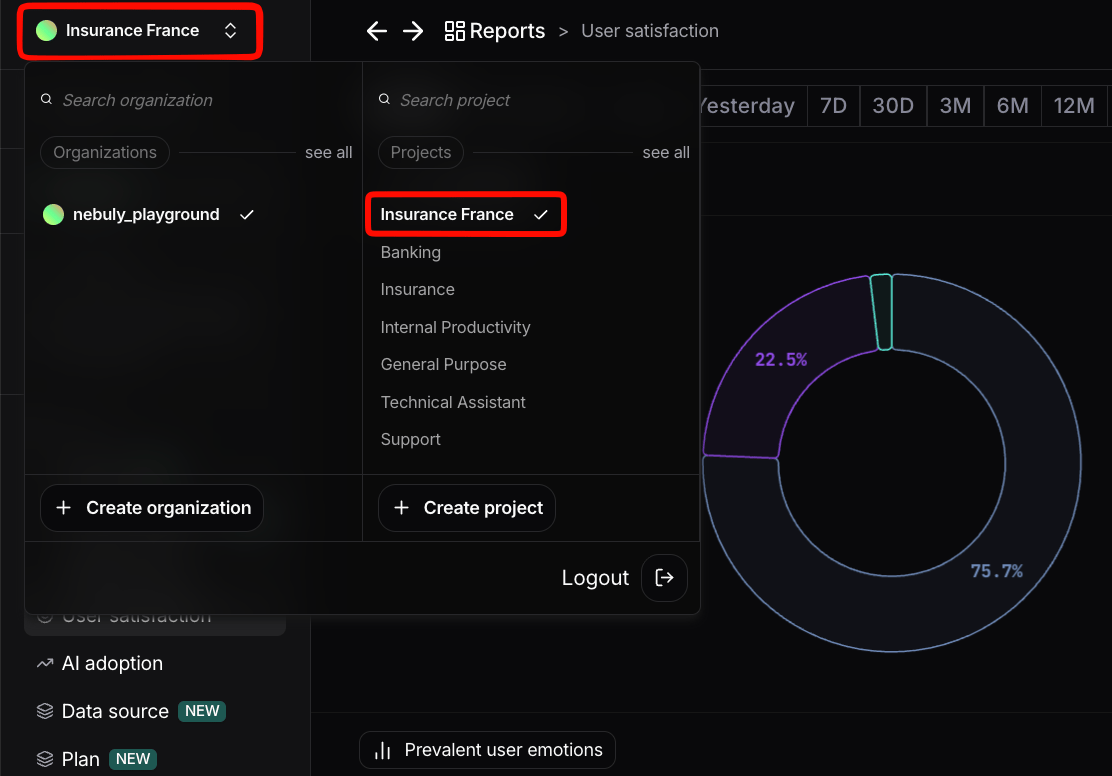
Use the organization/project switcher to move between organizations and projects.
Nebuly remembers the last project you opened and restores it automatically the next time you sign in.
 ### Comparing projects
Reports can compare two projects side by side, allowing you to analyze differences between AI deployments, teams, or regions without rebuilding your reports.Best practices
* Create one **root project** per AI application.
* Use **sub-projects** to segment the same data by region, department, or business unit.
* Use **Organizations** only when complete isolation of data, users, or configuration is required.
Read more about how to compare projects [here](/guides/reports/configure-reports).
## Managing organizations & project
To learn how to create projects, configure permissions, and manage organizations, see [**Managing Organizations & Projects**](/guides/setup/projects-and-organizations).
### Comparing projects
Reports can compare two projects side by side, allowing you to analyze differences between AI deployments, teams, or regions without rebuilding your reports.Best practices
* Create one **root project** per AI application.
* Use **sub-projects** to segment the same data by region, department, or business unit.
* Use **Organizations** only when complete isolation of data, users, or configuration is required.
Read more about how to compare projects [here](/guides/reports/configure-reports).
## Managing organizations & project
To learn how to create projects, configure permissions, and manage organizations, see [**Managing Organizations & Projects**](/guides/setup/projects-and-organizations).