> ## Documentation Index
> Fetch the complete documentation index at: https://docs.nebuly.com/llms.txt
> Use this file to discover all available pages before exploring further.
# Projects and Organizations
> The hierarchical framework for managing multiple GenAI products and user segments: organizations, projects, and RBAC.
Projects and organizations are a hierarchical framework designed to manage multiple Generative AI products and user segments efficiently. As enterprises move from single pilots to "AI everywhere," this structure provides the necessary centralization to track usage and impact across various deployments and departments.
## Organizations
An **Organization** serves as the top-level administrative structure within the Nebuly platform. It acts as an umbrella for managing multiple initiatives and can be defined based on the specific needs of the enterprise. Common ways to define an Organization include:
* **Company Level**: representing the entire corporate entity.
* **Environment Level**: separating different stages of the lifecycle, such as **Production** versus **Development** environments.
Each Organization is **physically isolated**: the data ingested into one Organization is stored separately from every other Organization, with no data shared across Organizations.
## Projects
**Projects** are nested within an Organization and represent the primary unit of analysis. They allow teams to dive deeper into granular analytics for specific AI assets or user populations. A Project is typically mapped in one of two ways:
* **Per Chatbot/Assistant**: each project corresponds to a single GenAI product being measured.
* **Per User Segment**: projects can be dedicated to specific subgroups, such as users within different geographical markets.
### Root projects
A **root project** is a top-level project within an Organization. It is the primary unit of analysis and holds the interaction data ingested into it, with its own access controls. When you first create a root project it holds **no data**: you start sending interactions to it via the [Interaction API](https://docs.nebuly.com/tracking/api-reference/events/post-events-interaction-with-trace-v2). Two root projects never share data, and each root project has its own processing rules and clusters (for example, its own Topics).
### Sub-projects
A **sub-project** is nested under a root project. It does not store separate data; instead it is a **filtered view** of its parent project's data, defined by a global filter, with its own independent access controls. Sub-projects are ideal for segmenting an AI agent by country or region, so you can give the right internal teams access to only their data without re-ingesting anything. Access can be granted to a sub-project independently of its parent.
To create one:
1. Apply a **global filter** to the parent project (for example, `Country is France`).
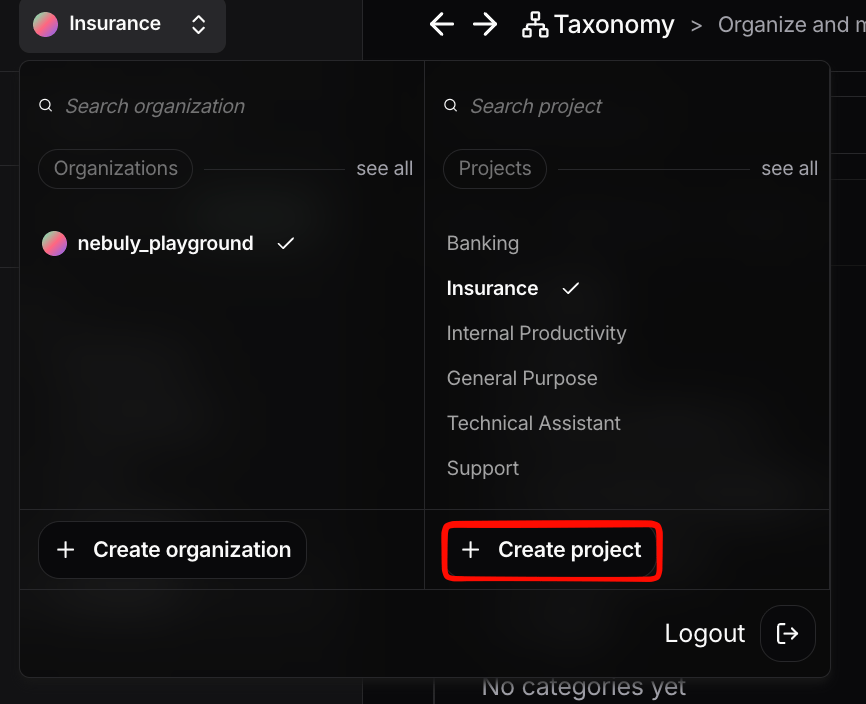
2. Click **Save** to open the *Save a new project* panel.
3. Select the **Organization**.
4. Review the **global filters** that will define the sub-project.
5. Enter a **project name**.
6. Click **Confirm**.
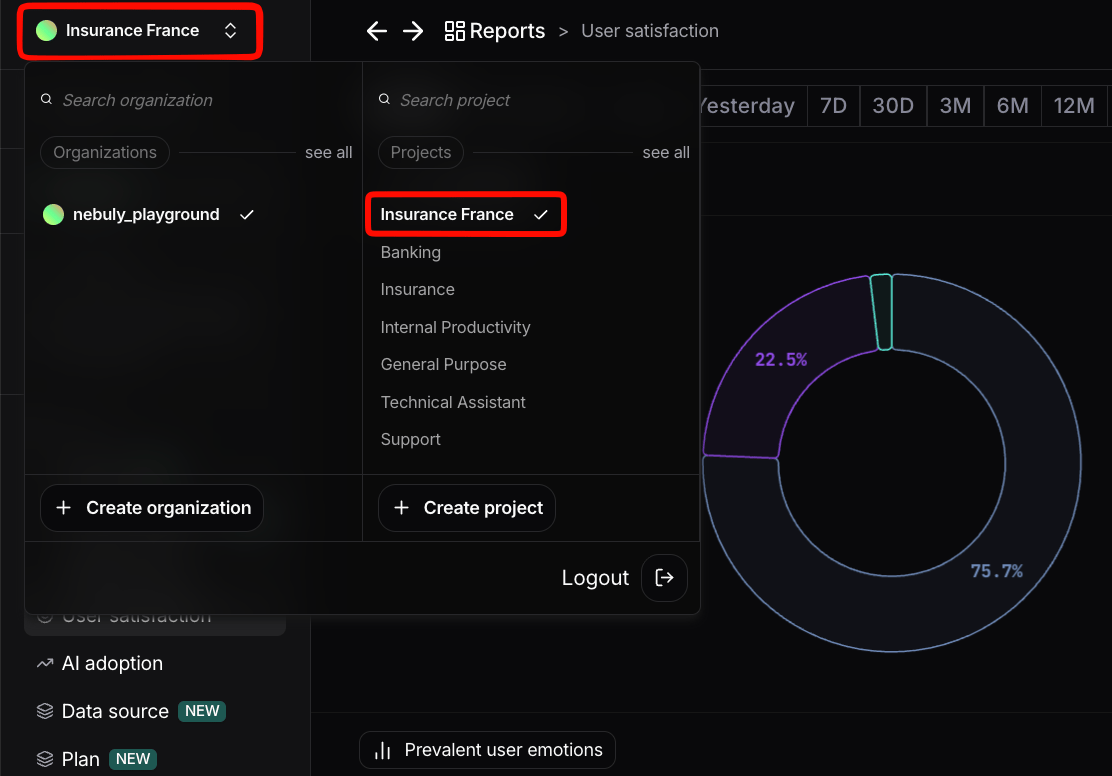
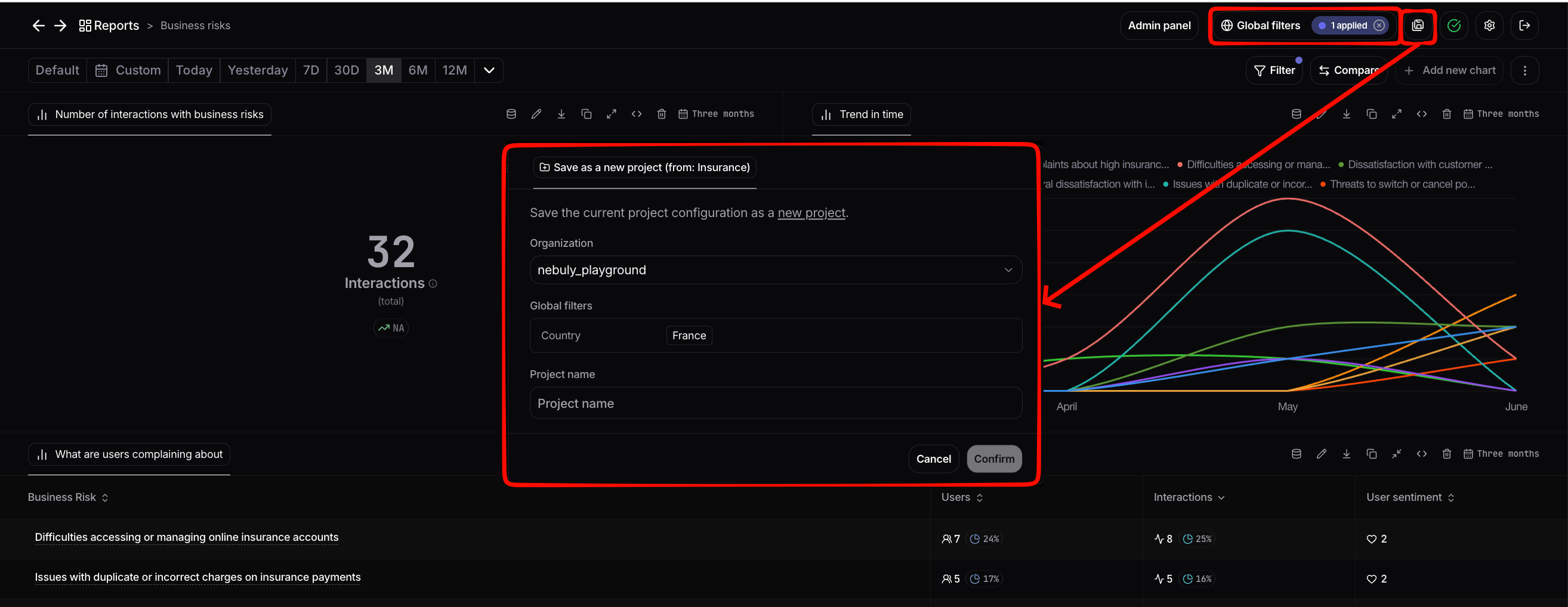 Once saved, the sub-project appears in the project switcher. Select it to scope the entire view to its filtered data, just like any other project.
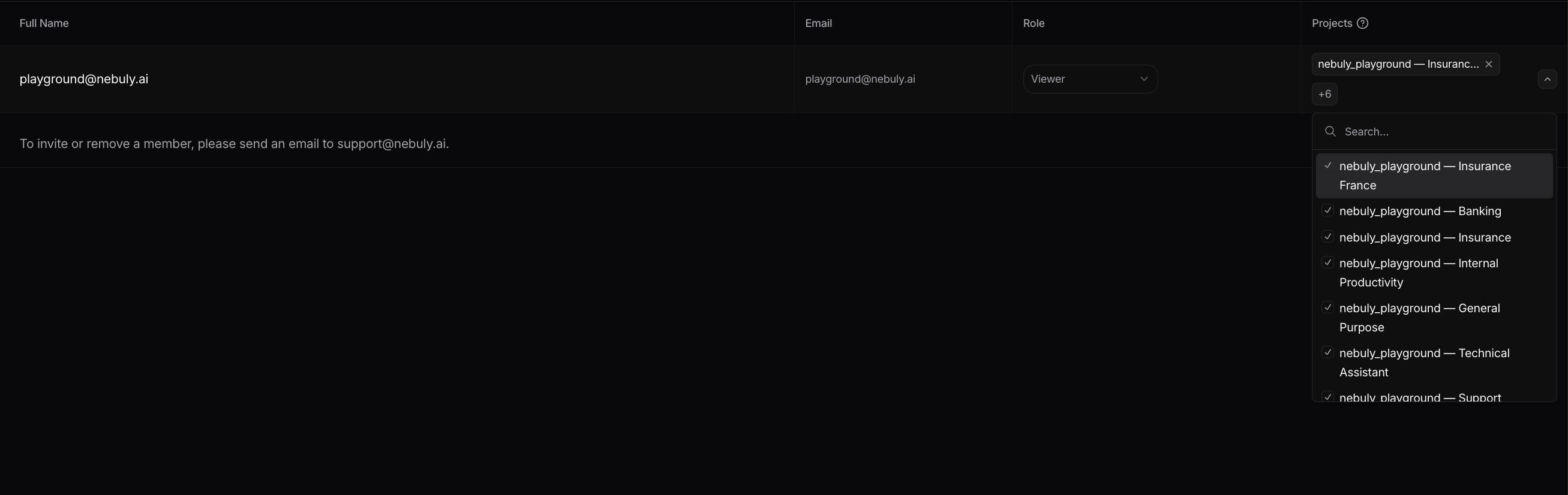
 You can also restrict which users can access a sub-project independently of its parent. See [Managing project access](/guides/permissions-and-user-management#managing-project-access).
## Key Management Features
The relationship between Organizations and Projects is supported by several platform features to ensure security and workflow efficiency:
Data in Nebuly is segmented along clear boundaries. A single data point belongs to **exactly one Organization**, but can appear in **multiple projects** (a root project and any of its sub-projects). **Organization-level settings are fully distinct per Organization**, so SSO, permissions, and alerts are all managed at the Organization level. **Processing settings** such as topics and ROI are configured per **root project**, and permissions can also be granted at the project level.
* **Role-Based Access Control (RBAC):** Admins manage access at the project level, determining which users can view and work on specific data sets. By default, new users may be given access to all projects, but this can be restricted to maintain focus and security.
* **Automatic Project Recall:** For a streamlined user experience, the platform automatically returns users to the last project they viewed upon login, allowing them to resume analysis without manual navigation.
* **Project Comparison:** Within [Reports](/guides/reports-guide), you can pull a second project alongside the current one to [compare](/guides/reports-guide#compare) metrics side by side, useful for spotting variance across deployments (e.g. an internal copilot vs. a customer-facing assistant). {/* Claude (per your request): linked 'compare' to the broadened Reports compare section */}
By utilizing this structure, organizations can overcome the fragmentation that occurs when every department runs its own AI assistant, ensuring a unified view of ROI and user outcomes across the entire AI portfolio.
### Managing project access
By default, new users may be granted access to all projects in the Organization, but this can be restricted on a per-project basis to maintain focus and security.
To change which users have access to a specific project, an Admin can open the project's settings and adjust the access list. Project-level access is governed by **RBAC** and is independent of Organization-level membership. A user can be a member of an Organization without having access to every project inside it.
You can also restrict which users can access a sub-project independently of its parent. See [Managing project access](/guides/permissions-and-user-management#managing-project-access).
## Key Management Features
The relationship between Organizations and Projects is supported by several platform features to ensure security and workflow efficiency:
Data in Nebuly is segmented along clear boundaries. A single data point belongs to **exactly one Organization**, but can appear in **multiple projects** (a root project and any of its sub-projects). **Organization-level settings are fully distinct per Organization**, so SSO, permissions, and alerts are all managed at the Organization level. **Processing settings** such as topics and ROI are configured per **root project**, and permissions can also be granted at the project level.
* **Role-Based Access Control (RBAC):** Admins manage access at the project level, determining which users can view and work on specific data sets. By default, new users may be given access to all projects, but this can be restricted to maintain focus and security.
* **Automatic Project Recall:** For a streamlined user experience, the platform automatically returns users to the last project they viewed upon login, allowing them to resume analysis without manual navigation.
* **Project Comparison:** Within [Reports](/guides/reports-guide), you can pull a second project alongside the current one to [compare](/guides/reports-guide#compare) metrics side by side, useful for spotting variance across deployments (e.g. an internal copilot vs. a customer-facing assistant). {/* Claude (per your request): linked 'compare' to the broadened Reports compare section */}
By utilizing this structure, organizations can overcome the fragmentation that occurs when every department runs its own AI assistant, ensuring a unified view of ROI and user outcomes across the entire AI portfolio.
### Managing project access
By default, new users may be granted access to all projects in the Organization, but this can be restricted on a per-project basis to maintain focus and security.
To change which users have access to a specific project, an Admin can open the project's settings and adjust the access list. Project-level access is governed by **RBAC** and is independent of Organization-level membership. A user can be a member of an Organization without having access to every project inside it.