

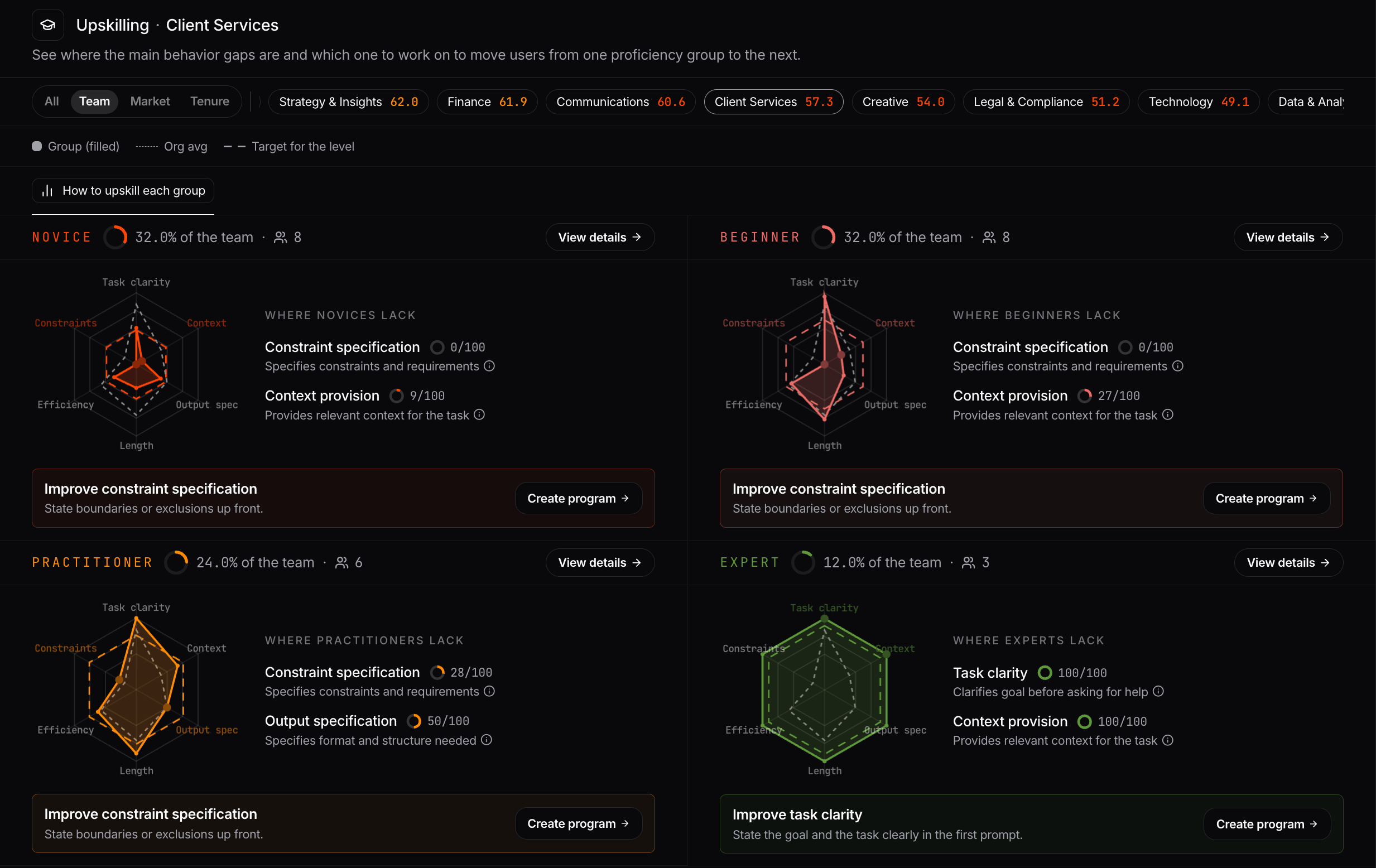
Proficiency groups
Each user is assigned to one of four proficiency levels based on their AI proficiency score. This score summarizes how consistently the user demonstrates the prompting behaviors measured by Nebuly. Read more here about AI score and proficiency level. For each level, you can see how many users it contains and what share of the selected group they represent. A user moves to the next proficiency level once they reach the target, the minimum score required to move up from their current level.The six behaviors
The proficiency score is based on six prompting behaviors, each scored from 0 to 100:| Behavior | What it measures |
|---|---|
| Task clarity | Clearly states the goal or task |
| Context provision | Provides the context needed to complete the task |
| Output specification | Specifies the expected format or structure |
| Constraint specification | States relevant constraints and requirements |
| Conversation efficiency | Reaches a useful answer in fewer turns |
| Prompt length | Provides enough detail without unnecessary information |
How to upskill each group
The How to upskill tab contains one card for each proficiency level. Each card includes a radar chart showing the six behaviors for that group, scored from 0 to 100:- Filled area: the group’s current scores
- Dotted line: the organization average
- Dashed line: the target needed to move to the next proficiency level
View details
Click View details on any proficiency level to see the full breakdown of its behaviors. For each behavior, you can see:- The group’s current score
- The gap between the current score and the target
- A score bar showing the target and organization average
- A Create program button
Create program
A program is a training message designed to help a specific group improve one prompting behavior. Click Create program to generate a ready-to-send short program for a behavior and proficiency level. Each program includes:- Your objective: a concrete habit to practice
- Why it matters: an explanation of how the behavior affects AI usage
- Examples: weaker and stronger prompt examples that show how to apply the behavior
Promotion potential
Promotion potential shows which users are closest to reaching the target for the next proficiency level. For each transition, you can see how many users are close to moving up and what share of their current level they represent:- Novice → Beginner
- Beginner → Practitioner
- Practitioner → Expert
Filter the view
Use the tabs at the top of the page to analyze different groups:- All shows the entire organization.
- Team groups users by team. Each team includes its average proficiency score. Use Map to tags to define which user tags belong to each team.
- Market groups users by market or region.
- Tenure groups users by how long they have been using AI tools.
Build your own reports
Upskilling metrics and dimensions are also available in Nebuly’s reporting engine. You can combine proficiency levels, behavior scores, behavior gaps, and user attributes with your existing filters and groupings to analyze where different groups need support. For example, you can build reports to understand:- Which teams have the largest proficiency gaps
- Which prompting behaviors are weakest across the organization
- How behavior scores change over time
- Which teams or user groups are closest to reaching the next proficiency level
- Whether training programs are improving the behaviors they target