

- Understand why users become frustrated.
- Identify the most common AI failure patterns.
- Prioritize improvements based on user impact.
- Measure whether AI quality is improving over time.
- Reduce unsuccessful conversations and increase task completion.
Failure Intelligence overview
How Failure Intelligence works
Nebuly evaluates every conversation to determine whether the user successfully achieved their goal. Unlike traditional monitoring platforms, Nebuly defines an error from the user’s perspective, not the model’s. A conversation can be technically successful—with no exceptions, timeouts, or API failures—and still be classified as a failure if the user didn’t receive the help they expected. To identify these failures, Nebuly analyzes three categories of signals:- Explicit feedback — Direct user feedback such as thumbs down or negative ratings.
- Implicit feedback — Behavioral signals that indicate dissatisfaction, including repeated rephrasing, corrections, abandonment, or expressions of frustration.
- AI reasoning and responses — The model’s reasoning process, generated responses, and execution steps to detect hallucinations, misunderstandings, incorrect reasoning, or incomplete task execution.
What is an error in Nebuly?
In Nebuly, an “error” is defined from the user’s perspective, not the model’s. The platform’s models understand frustration and friction as the user experiences them. A conversation can be technically successful (no exception, no timeout, a syntactically valid response) and still be a failure if the user didn’t get what they came for. This matters because traditional feedback mechanisms can’t see most of these failures. Nebuly closes that gap by treating every interaction as feedback (see What is Nebuly? for the underlying philosophy).Analyzing the error rate
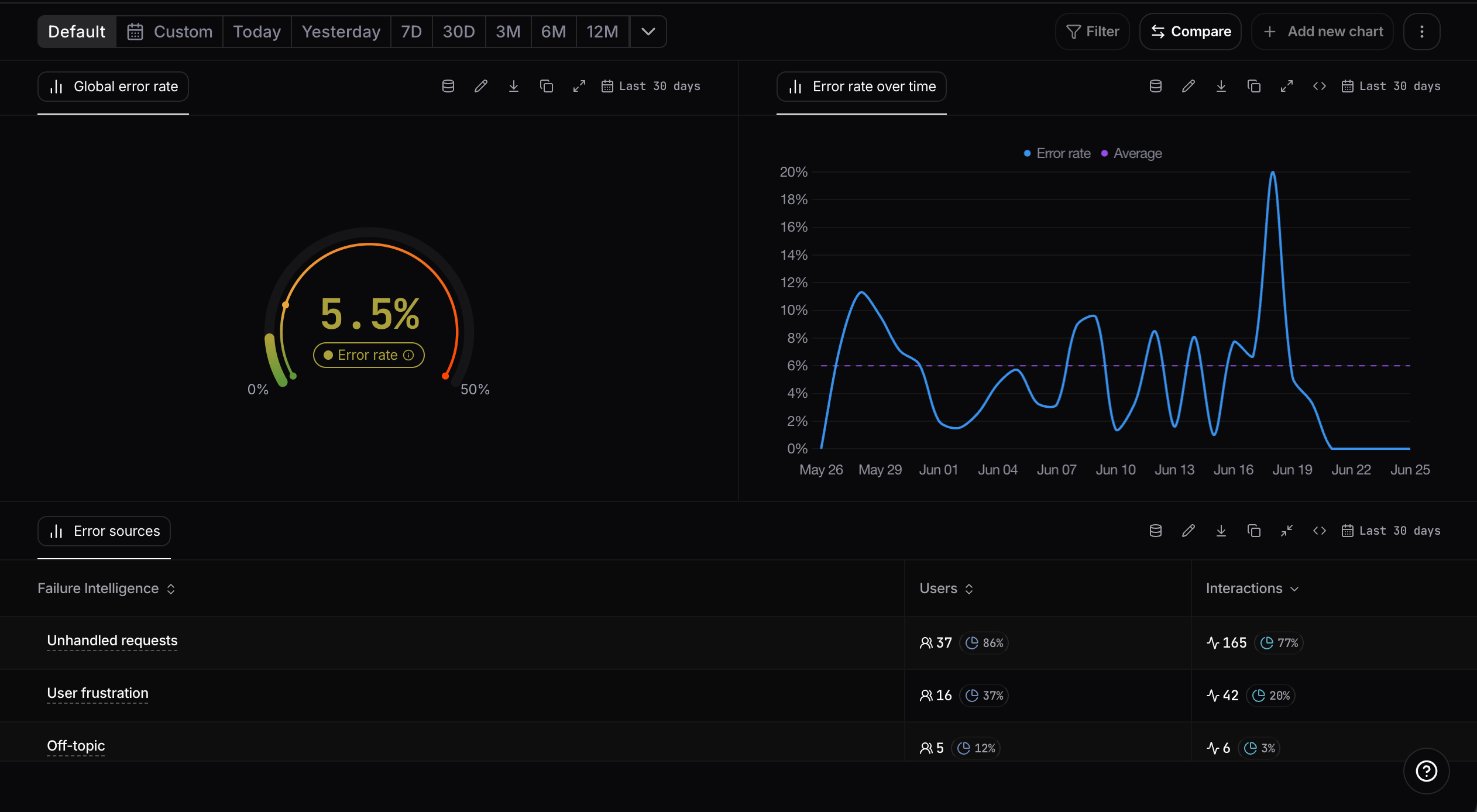
Nebuly ships with a built-in Failure Intelligence report, so you can start analyzing failures right away with no setup. It tracks your overall error rate over time and breaks it down by error type, so you can see which failures are most common and whether they are trending up or down. Like any report in Nebuly, it is a starting point for investigation: right-click any point on the error-rate chart to drill straight into the conversations, interactions, and users behind it. For how this drill-down works, see Navigating Nebuly.The Failure Intelligence report
Nebuly’s Failure Intelligence report provides an overview of your AI quality and the issues affecting your users. It includes the following visualizations.Global Error rate
Shows the percentage of interactions that Nebuly classified as unsuccessful during the selected period. Use this KPI to monitor the overall quality of your AI application and track improvements over time.Error rate trend
Tracks how the overall error rate changes over time. Use this chart to identify regressions, measure the impact of prompt or model updates, and monitor the stability of your AI experience.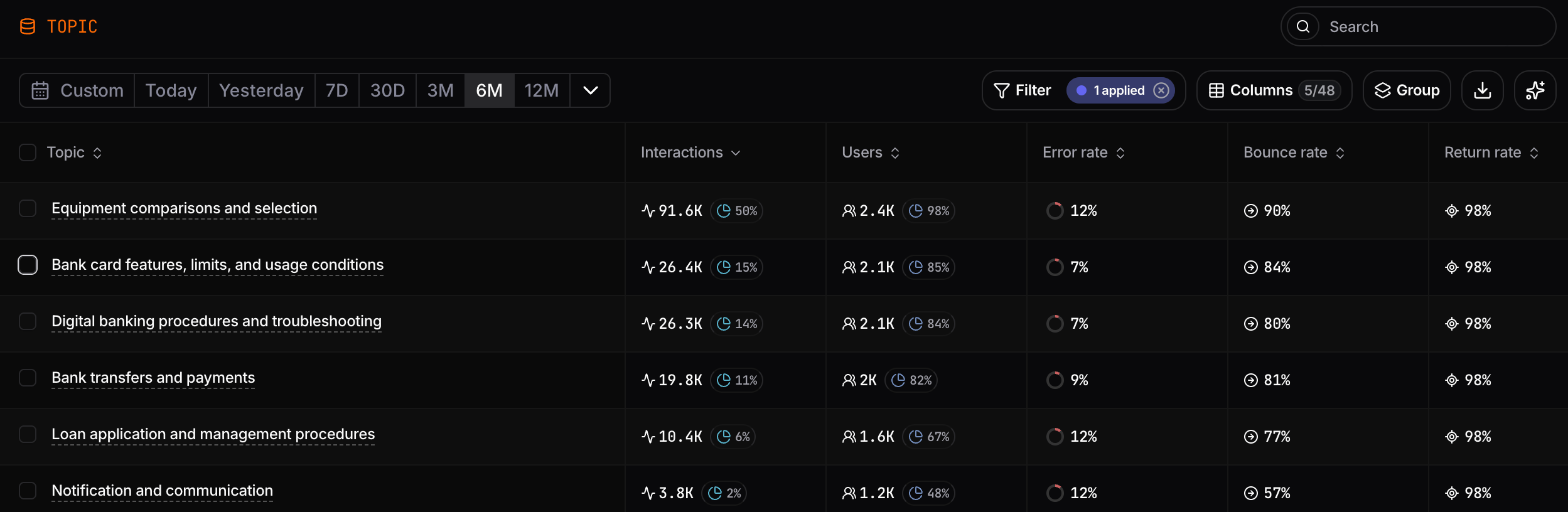
Error sources
Nebuly automatically classifies errors into a small set of buckets. The defaults are listed below; you can rename, redefine, or move interactions between categories. See Taxonomy for the workflow.- Unhandled Requests: the AI correctly identifies that it cannot answer due to developer-set constraints (safety filters, lack of data access, etc.).
- Empty Response: the model fails to generate any answer.
- User Frustration: detected via sentiment analysis and behavioral signals like rephrasing, repeating, or abandonment.
- Language Problems: issues arising from multilingual support gaps or queries the AI cannot handle in the user’s language.
- Off-topic: user asks questions unrelated to the AI’s intended purpose.
- Task Failure: the AI attempted the user’s task but didn’t complete it correctly (wrong answer, partial result, missed step).

Conversation health
Provides an overview of the health of all AI conversations by classifying them into three categories:- Successful — The user successfully completed their task with no signs of dissatisfaction.
- Problematic — The conversation contained issues or signs of friction, but the user may still have achieved their goal.
- Abandoned — The user left the conversation before successfully completing their task, indicating a likely failure.
Conversation health over time
Tracks the distribution of Successful, Problematic, and Abandoned conversations over time. Use this chart to monitor changes in conversation quality, identify regressions after model or prompt updates, and measure the impact of improvements on the overall user experience.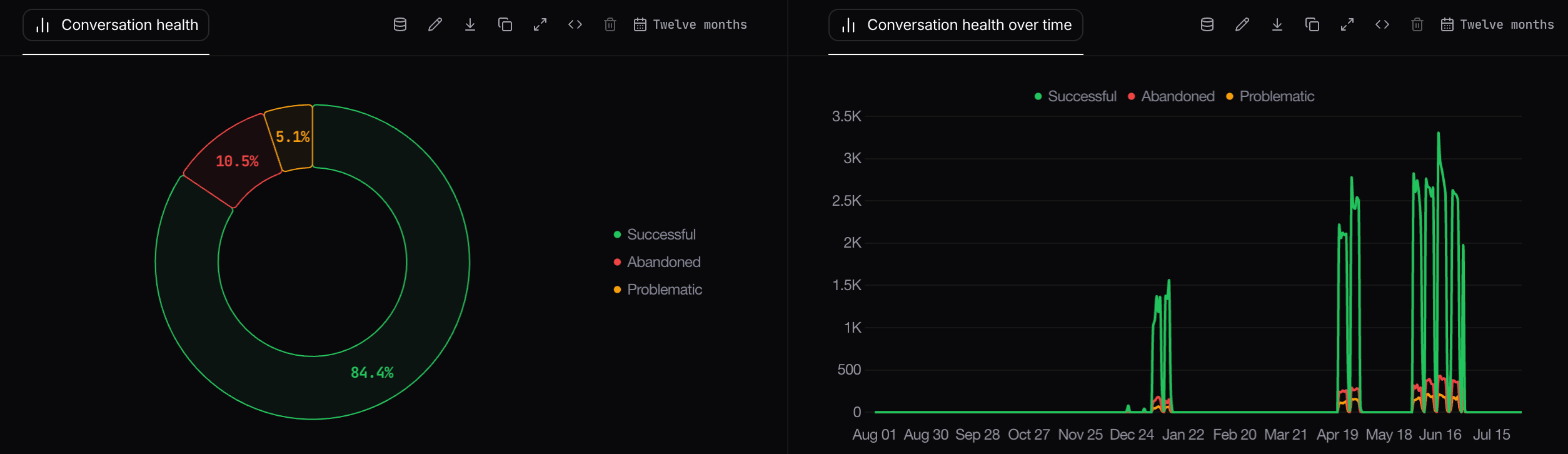
Manually changing an error type
You can move the problems Nebuly identifies from one category to another if you believe a different bucket is a better fit. From that moment on, Nebuly’s models will learn from your modifications and improve future classifications. To do this, open a conversation’s details and edit the Type of problem field.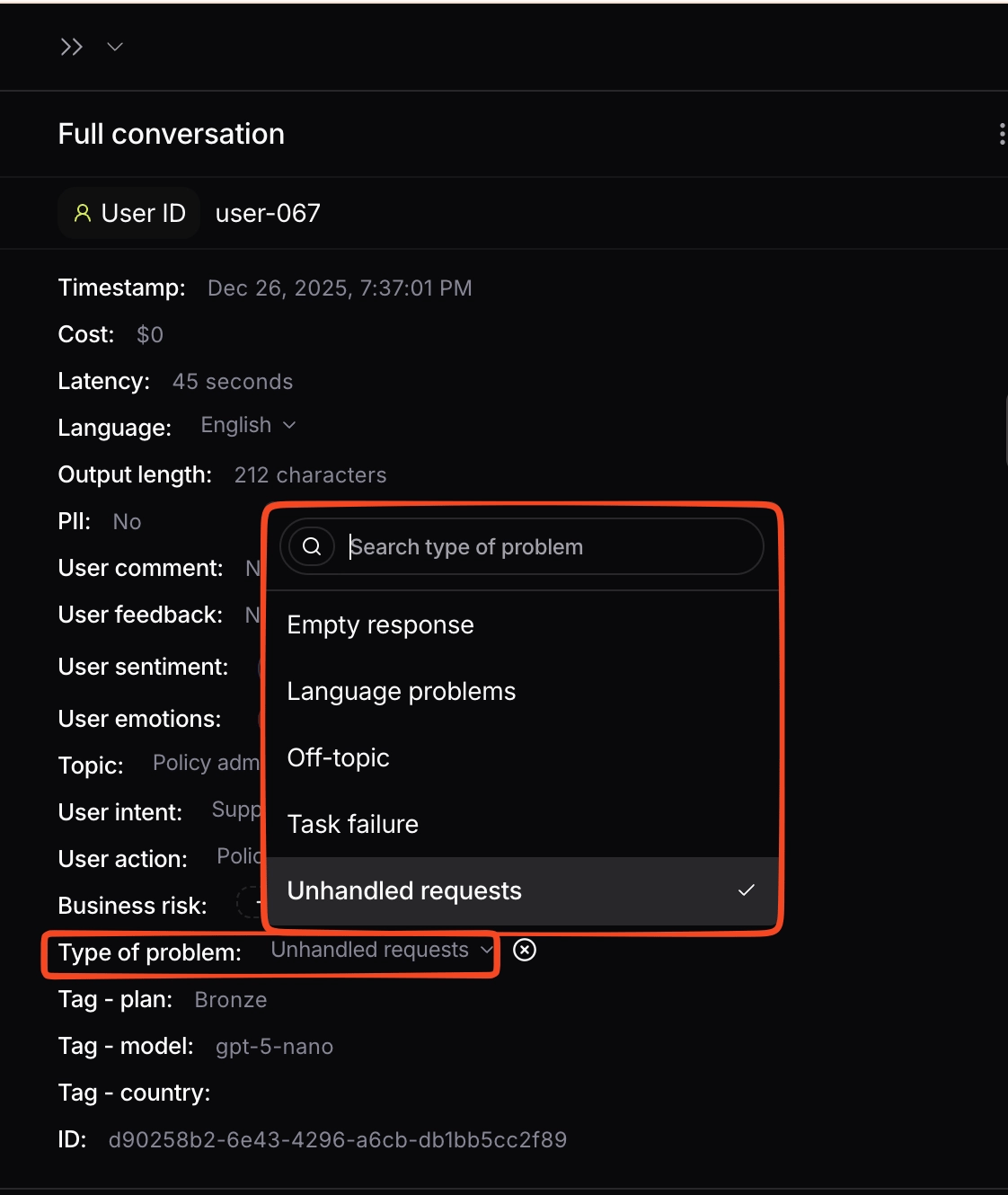
Changing the type of problem on a conversation
Building your own Failure Intelligence reports
All Failure Intelligence metrics and dimensions are available throughout Nebuly’s reporting engine, allowing you to build custom reports tailored to your organization. You can combine failure metrics with existing metrics, filters, and groupings to answer questions such as:- Which AI agents generate the highest error rate?
- Which topics produce the most failures?
- Which user groups experience the most unsuccessful conversations?
- How has AI quality changed over time?
- Which business processes are most affected by failures?
- Which failure types occur most frequently?