

Organizations
An Organization is the highest-level container in Nebuly. Organizations provide complete isolation between environments, including data, users, authentication, and configuration. They are typically used to separate:- Different companies
- Production and development environments
- Business entities requiring complete data isolation
Projects
A Project is the primary unit of analysis inside an Organization. Projects contain the interactions, conversations, users, reports, taxonomies, and analytics for a specific AI deployment. Projects can fall into two categories:- Employee-facing projects — AI applications used internally by employees, such as copilots, internal assistants, or support tools.
- Customer-facing projects — AI applications used by customers or other external users, such as customer support agents or in-product assistants.
- AI assistant or agent
- Product
- Business unit
- Team, region or market
Root projects
A Root Project stores the actual interaction data. Every conversation ingested belongs to a single root project. Each root project has its own:- Reports
- Taxonomies & ROI/Proficiency configuration
- Processing pipeline
Sub-projects
A Sub-project is a filtered view of a root project. Instead of storing duplicate data, a sub-project applies a permanent filter to its parent project while maintaining its own permissions. For example, you could create:- Customer Support → France
- Customer Support → Germany
- Customer Support → Italy
Switching organizations & projects
Use the organization/project switcher to move between organizations and projects. Nebuly remembers the last project you opened and restores it automatically the next time you sign in.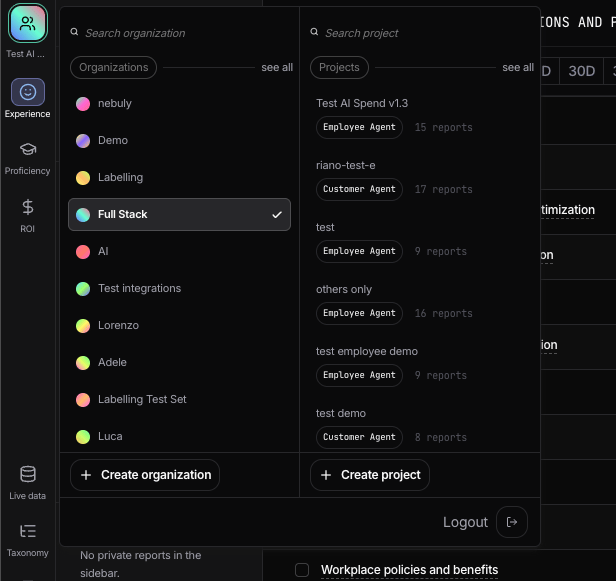
Comparing projects
Reports can compare two projects side by side, allowing you to analyze differences between AI deployments, teams, or regions without rebuilding your reports.Best practices- Create one root project per AI application.
- Use sub-projects to segment the same data by region, department, or business unit.
- Use Organizations only when complete isolation of data, users, or configuration is required.